Slides
The section of iGene shows a list of all slides currently stored.
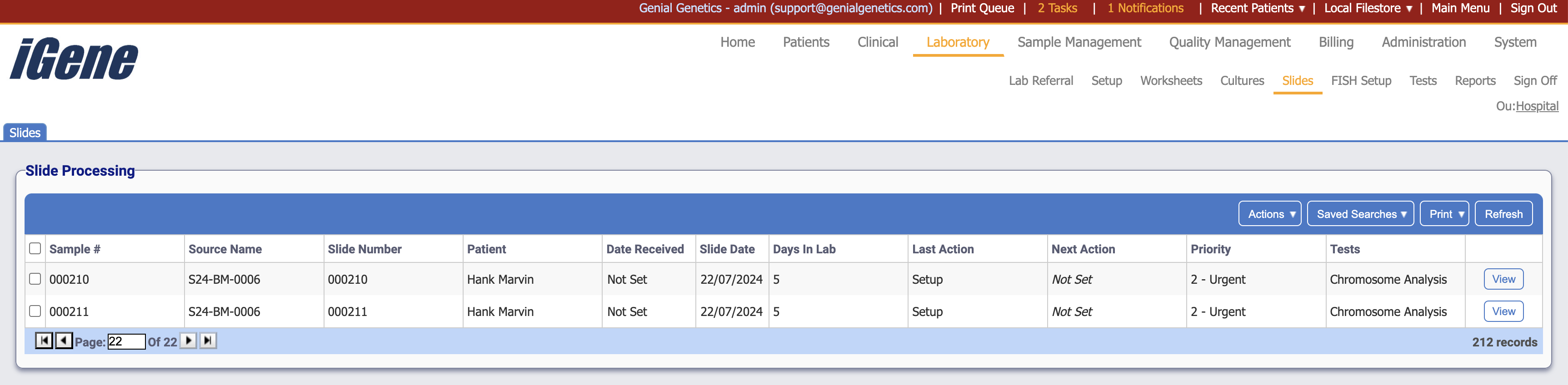
Table Columns
- Sample # - The unique number assigned to the sample.
- Source Name - The name of the sample tube.
- Slide Number - The number of the specific slide.
- Patient - The name of the patient to who the referral is attached.
- Date Received - If set, this will display the date that the slide was received.
- Slide Date - The setup date of the slide.
- Days In Lab - the amount of days that the slide has existed in the laboratory.
- Last Action - The last action taken on the culture.
- Next Action - If set, this will display the next action planned for the slide.
- Priority - The priority of the slide.
- Tests - The test names on the slide.
- View - Opens the setup page for the clicked slide.
Additional Actions
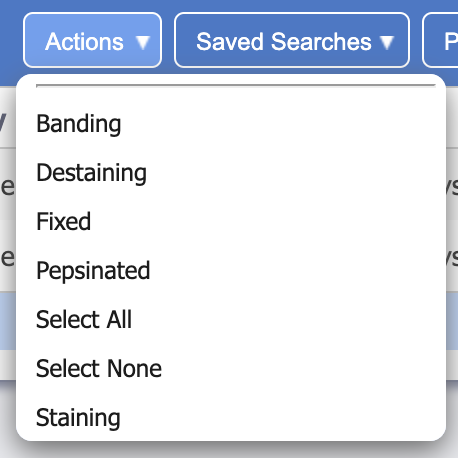
- Banding - Opens a popup where reagents can be added and saved as a banding.
- Destaining - Opens a popup where reagents can be added and saved as a destain.
- Fixed - Sets the selected sample as fixed.
- Pepsinated - Sets the selected sample as pepsinated.
- Select All - Selects all rows on the page.
- Select None - Un-selects all rows on the page.
- Staining - Opens a popup where reagents can be added and saved as a stain.