Sign Off
This page shows all reports awaiting authorisation within iGene. Reports that do not require any signatures can be authorised providing that the user has this permission. If signatures are required, then these must be added first.
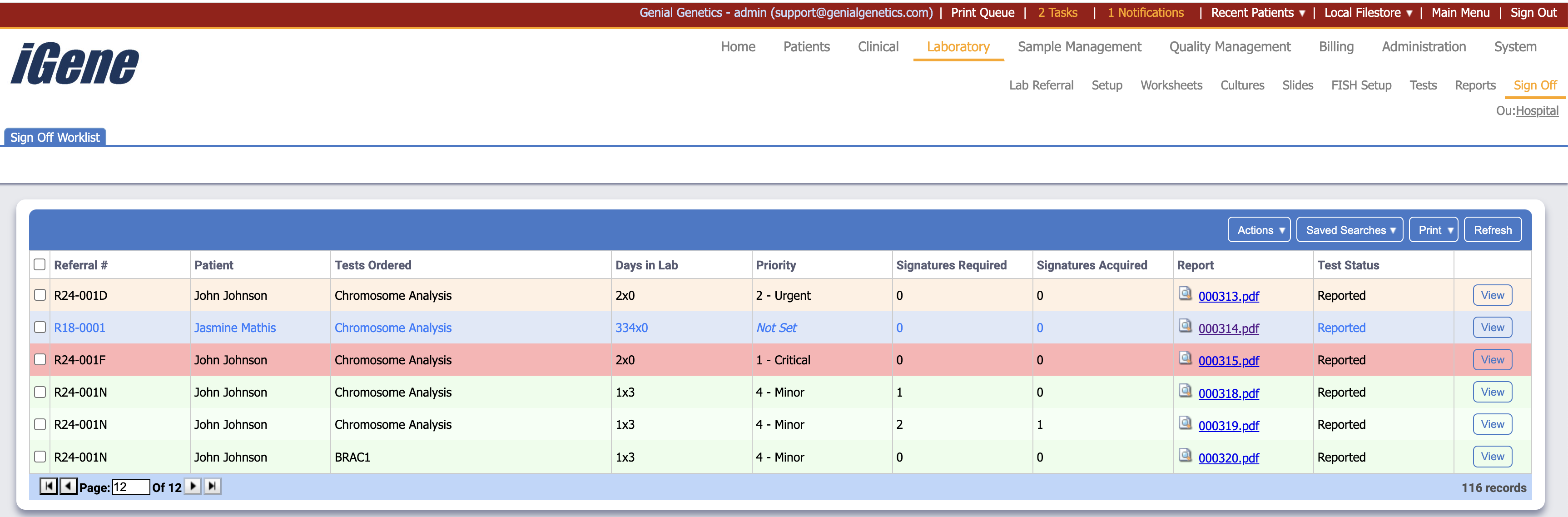
Table Columns
- Referral # - The unique number assocaited with the referral.
- Patient - The name of the patient.
- Tests Ordered - The list of tests associated with the referral.
- Dates in Lab - If the referral is ongoing, this is the amount of days between the referral being created and now. If it is closed, it is the amound of days between being created and closed.
- Priority - The level of priority assocaited with the referral.
- Signatures Required - The amount of signatures needed before the report can be authorised.
- Signatures Acquired - The amount of signatures already added to the report.
- Report - A hyperlink to the report itself.
- Test Status - The status of the test.
- View - Opens the list of report screen in iGene.
Additional Actions
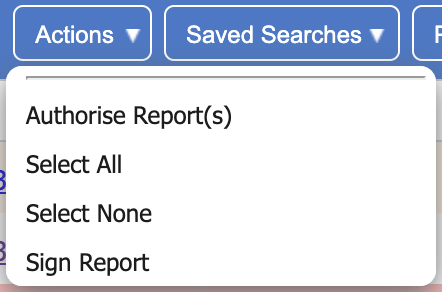
- Authorise Report(s) - If the reports have the necessary amount of signatures, then they will be authorised. If not, an error will show.
- Select All - Selects all rows on the page.
- Select None - Un-selects all rows on the page.
- Sign Report - If the user is in the list of signatures for the report, then a popup box will show asking for their password to confirm the signature. If the user is not on the list, an error will show.