Setup
This page displays a link to each setup screen for the referrals. The setup screen is where tests and samples are handled, such as results being entered and checked.
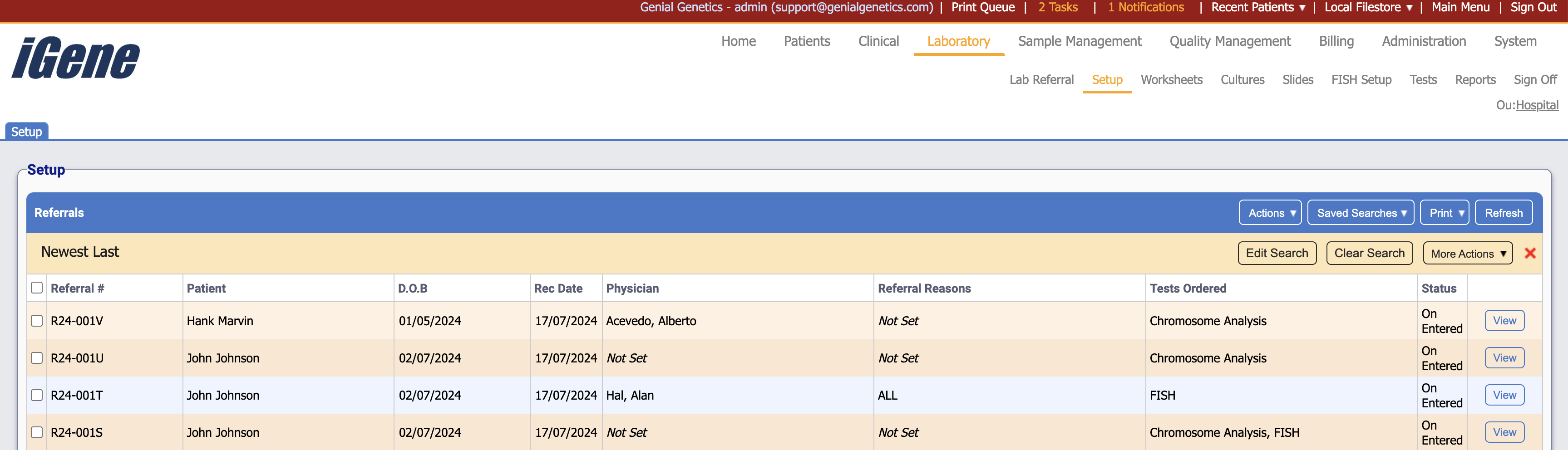
Table Columns
- Referral # - The unique referral number for this specific referral.
- Patient - The name of the patient to who the referral is attached.
- D.O.B - The date of birth of the patient.
- Rec Date - The date that the referral was received.
- Physician - A list of any and all referring physicians on the laboratory referral.
- Referral Reasons - If this has been set, then the reasons for the referral will be shown here.
- Tests Ordered - Any tests that have been ordered for this referral.
- Status - A customisable status for the laboratory referral. These can be set up in Administration > Preferences > Referral Status
- View - Opens the setup page for the clicked referral.
Additional Actions
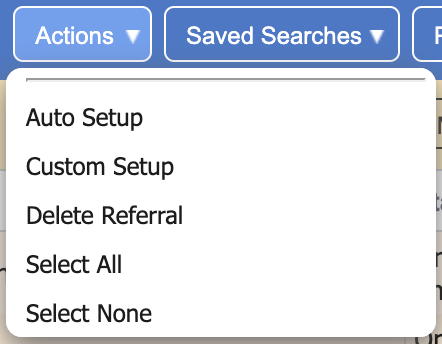
- Auto Setup - If a culture package has been set up, then this is auto-run the appropriate package.
- Custom Setup - If the user wishes to set the setup manually, then this opens a popup where samples and cultures can be input and saved manually.
- Delete Referral - Deletes the selected referrals.
- Select All - Selects all rows on the page.
- Select None - Un-selects all rows on the page.