Webhook Events
The Webhook Events preference is used to record a list of webhook events in the system. These are more complex than other customisable areas of iGene, so it is recommended that you contact support to set up these areas.
A webhook event is a notification that is sent from one application to another when a specific event occurs. It’s a way for systems to automatically push data or updates in real time rather than having another system poll or repeatedly ask for updates. Webhooks are often used in web applications to notify external systems about changes or activities in real time.
Location
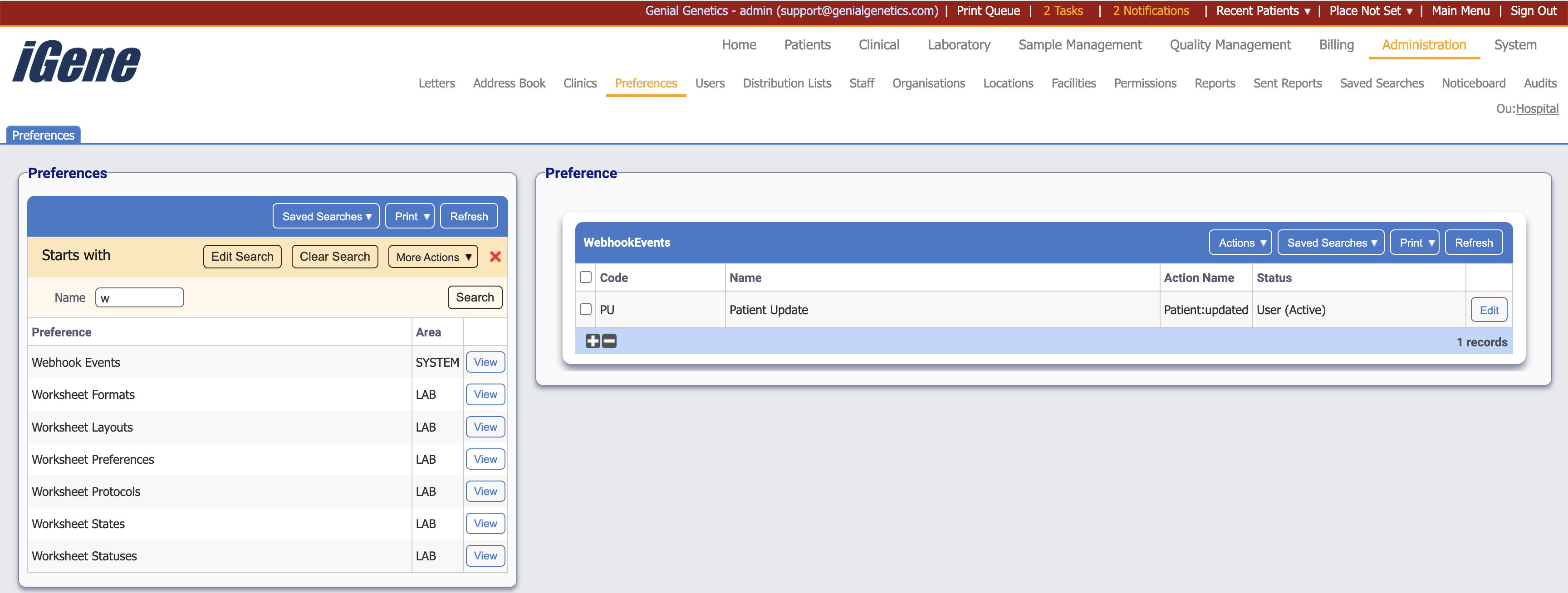
The table of Webhook Events will display the code, name, action name and status for the webhook event.
Configuration
When adding or editing a webhook event, users are presented with the below form to complete. Always press Save in the bottom right-hand corner of the browser after adding or editing a webhook event.

Code (Required, Unique)
A unique code for the webhook event. This can be the same as the name but must be unique throughout the entire system.
Name (Required)
A name for the webhook event. It is advisable to keep this unique.
Action Name (Required)
A name for the action that will be triggered by the webhook event. It is advisable to keep this unique.
URL
The URL that the webhook event will be sent to.
Active
A checkbox to activate/deactivate an entry. If the preference is not active, it will not be selectable in any drop-down lists.
Bypass Queue
A checkbox to bypass the queue when sending the webhook event. If this is checked, then Webhook Property Name will display.
Webhook Property Name
The name of the property that will be sent in the webhook event.