Auto Sign Out
The Auto Sign Out preference allows an administrator to configure iGene to auto sign out users who have left their session inactive over a certain time period. It’s highly recommended to enable this option for both security and performance reasons.
Auto Sign Out options are a global setting and not related to any specific OU.
Auto Sign Out is determined by a user’s activity in the web browser. If the user has unsaved work and has left their computer inactive for the indicated time, the user’s session will be logged out and any unsaved changes will be lost.
Location
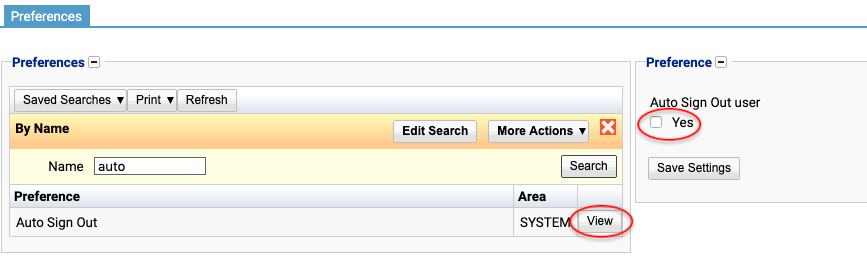
- Two new options will appear if clicking the checkbox:
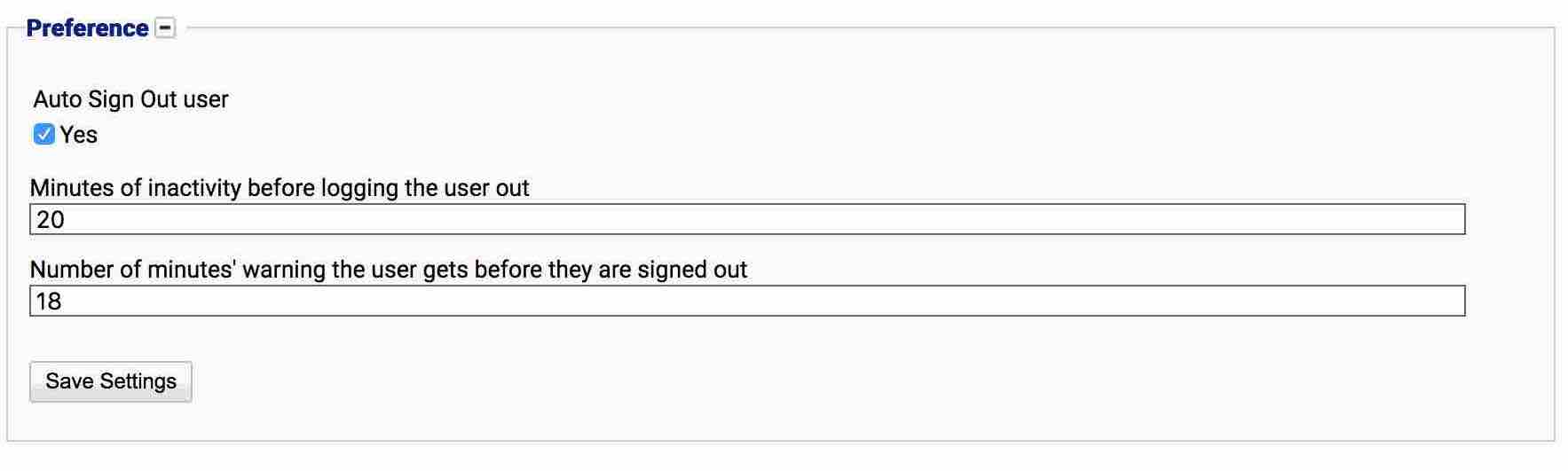
- Minutes of activity before logging the user out
- Number of minutes’ warning the user gets before they are signed out
- Enter the required values into the new fields.
- Press Save Settings. These changes will now take effect.
Configuration
Always press Save Settings after activating, deactivating or editing the Auto Sign Out preference.
The following options are available on the Auto Sign Out preference screen:
Auto Sign Out User
Indicates whether auto-signout is enabled.
Minutes of activity before logging the user out
The number of minutes a browser session can be inactive before the user will be signed out automatically.
Number of minutes’ warning the user gets before they are signed out
After the indicated number of minutes of inactivity, the user will be given a warning. It is recommend to set this value to at least 2 minutes less than the log out time so the user has a chance to see and react.
Deactivating / Activating
To deactivate the Auto Sign Out preference, uncheck the box. To activate, check the box.